Mess Subscription System
1. Overview
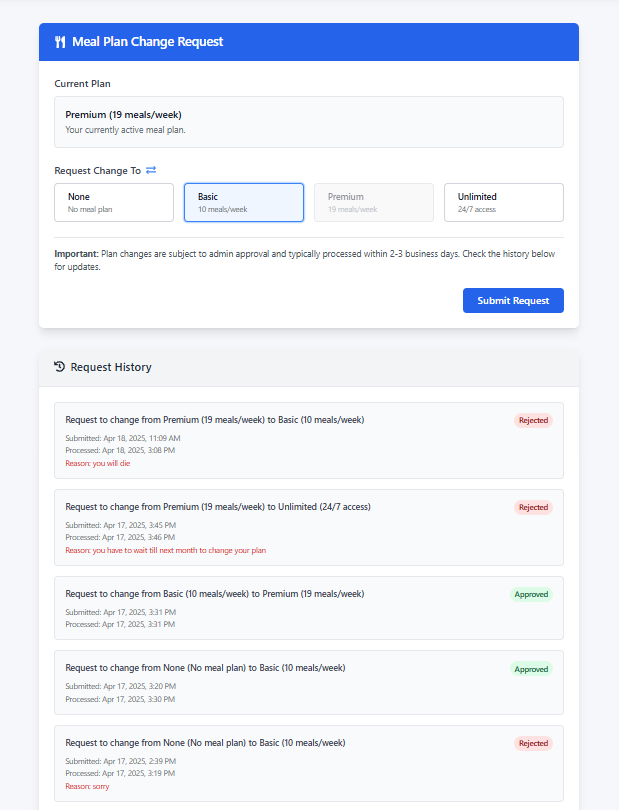
This page allows you to view your current meal plan, request changes to your meal plan, and track the status of your previous requests. You can select a new meal plan, submit a request for administrative approval, and check your request history.
2. Page Sections
The page is organized into the following sections:
2.1 Title Section
- Header: "Mess Subscription System" clearly identifies the page's purpose.
2.2 Current Plan Display
- Shows your currently active meal plan.
- Purpose: Lets you see which meal plan you currently have.
2.3 Request Change Section
- A selection of meal plan options (None, Basic, Premium, Unlimited).
- Purpose: Allows you to choose a new meal plan that differs from your current one.
2.4 Pending Request Notification (Conditional)
- This section appears only if you have a meal plan change request that is still pending approval.
- It displays details about your pending request including the requested plan and submission date.
- Purpose: Informs you that you have an active request being processed.
2.5 Submit Request Button
- Used to submit your meal plan change request.
- Purpose: Sends your request to administrators for approval.
2.6 Request History Section
- A list of all your previous meal plan change requests.
- Purpose: Allows you to track the status of current and past requests.
3. How to Use the Page
Follow these steps to request a meal plan change:
3.1 View Current Plan
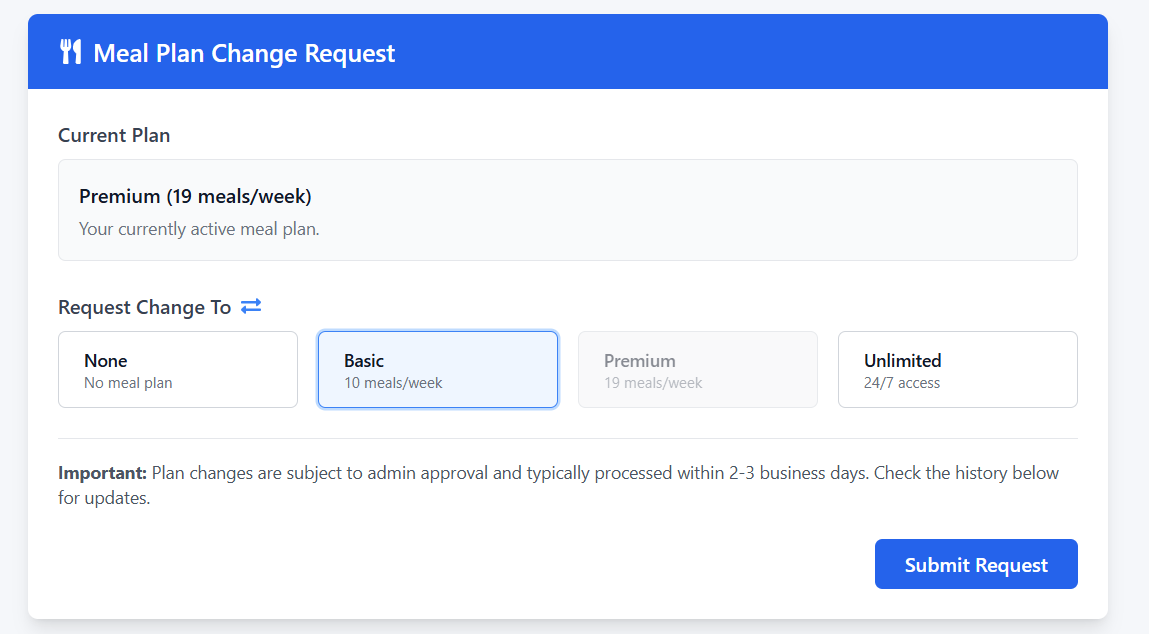
- When you access the page, your current meal plan is displayed in the "Current Plan" section.
- The display shows whether you have None, Basic (10 meals/week), Premium (19 meals/week), or Unlimited (24/7 access) plan.
3.2 Select a New Plan
- Click on one of the available meal plan options (None, Basic, Premium, Unlimited).
- Note that your current plan will be disabled and cannot be selected.
- Once selected, the meal plan option will be highlighted in blue.
3.3 Submit Your Request
- Click the "Submit Request" button.
- If the submission is successful, a success message will appear.
- Your request will now be pending approval by administrators.
- Note: While a request is pending, you cannot submit additional requests.
3.4 Check Request Status
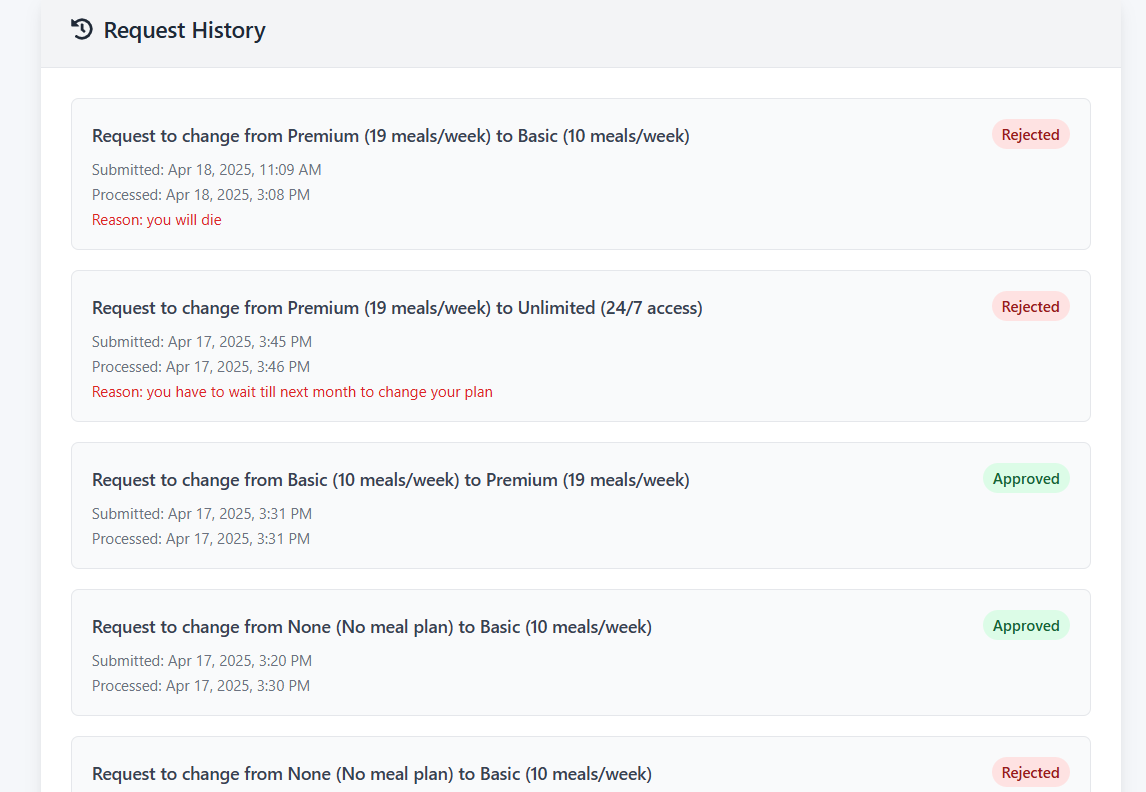
- Scroll down to the "Request History" section at the bottom of the page.
- Your latest request will appear at the top of the list.
- Each request shows:
- The change requested (from which plan to which plan)
- Current status (Pending, Approved, or Rejected)
- Submission date
- Processing date (if processed)
- Rejection reason (if rejected)
4. Important Notes & Troubleshooting
- Plan Selection Required: You must select a different meal plan than your current one before the Submit button becomes active.
- Pending Request Limitation: You can only have one pending request at a time. You must wait for current requests to be processed before submitting new ones.
- Processing Time: Requests typically take 2-3 business days to be processed by administrators.
- Plan Implementation: After approval, your new meal plan will generally take effect within 24 hours.
- Status Colors:
- Pending (Yellow): Request is awaiting administrative review
- Approved (Green): Request has been approved
- Rejected (Red): Request has been denied (with reason provided)
- Troubleshooting:
- If the "Submit Request" button is disabled, check that:
- You've selected a different plan than your current one
- You don't already have a pending request
- If you can't see your request history, try refreshing the page
- If error messages appear, follow any instructions provided or try again later
- For persistent issues, contact the mess administration office
5. Meal Plan Options
| Plan | Description | Details |
|---|---|---|
| None | No meal plan | No access to mess facilities |
| Basic | 10 meals per week | Limited access to mess facilities |
| Premium | 19 meals per week | Access to most meals throughout the week |
| Unlimited | 24/7 access | Unrestricted access to mess facilities |
6. Frequently Asked Questions
Q: How long will it take for my request to be processed?
A: Requests typically take 2-3 business days to be processed.
Q: Can I cancel my pending request?
A: The system does not currently support canceling pending requests. Please contact the mess administration directly if needed.
Q: When will my new meal plan take effect?
A: After approval, new meal plans generally take effect within 24 hours.
Q: Why can't I select a new plan?
A: You cannot submit a new request if you already have a pending request, or if you're trying to select your current plan.
Q: What happens if my request is rejected?
A: If your request is rejected, you'll see the reason in your request history. You can then submit a new request if needed.